TickTick Integration
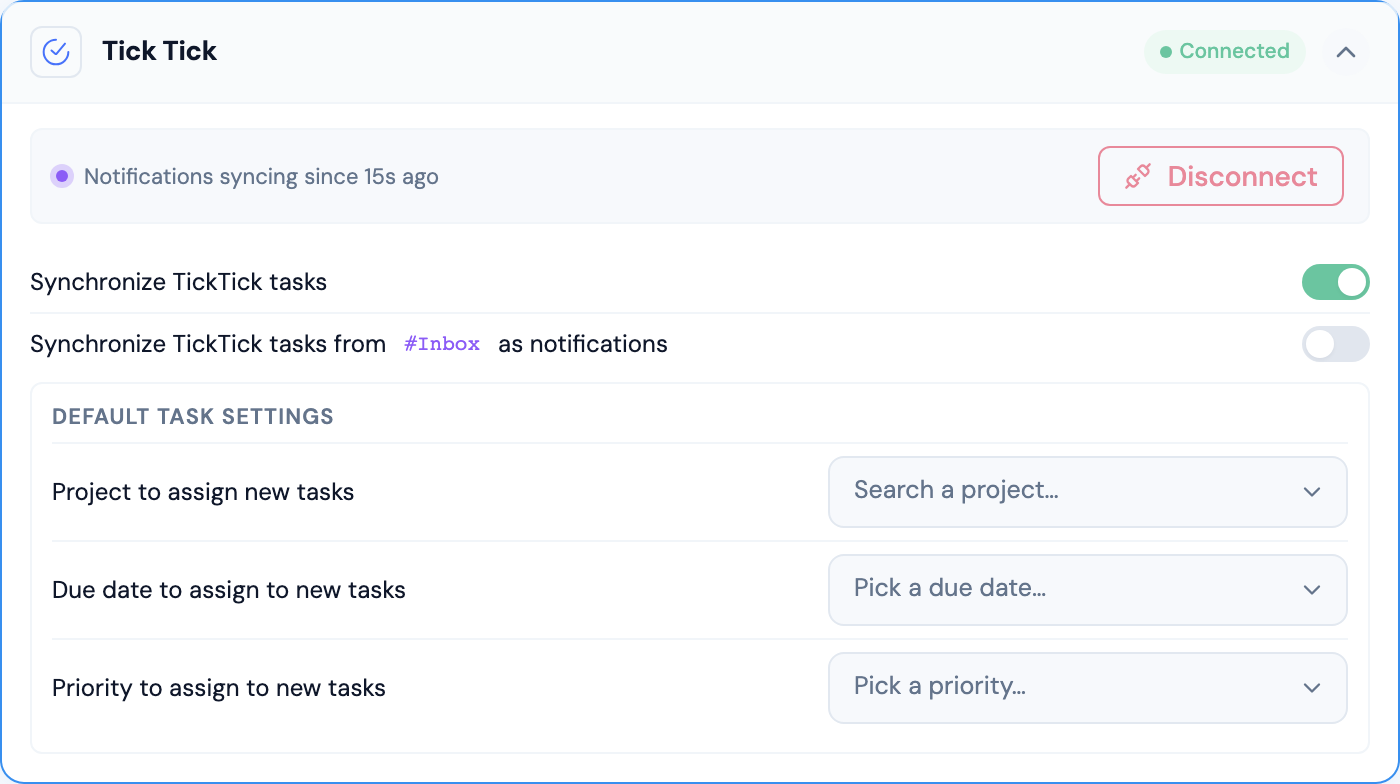
The TickTick integration is one of two task managers supported by Universal Inbox (the other is Todoist). Connecting TickTick lets you turn notifications into TickTick tasks and keeps the status of those tasks in sync with the source tools that generated the notifications.
You can connect Todoist and TickTick at the same time. When both are connected, integrations that create tasks (Linear assigned issues, Slack reactions, manual task creation) expose a task-manager picker so you choose which one receives the new task.
Key Features
Connecting TickTick with Universal Inbox enables you to:
- Create Tasks from Notifications: Convert any notification into a TickTick task
- Link Notifications to Tasks: Associate existing notifications with TickTick tasks you've already created
- Bidirectional Synchronization: Complete a task in TickTick and Universal Inbox marks the linked notification (and its counterpart in the source tool) as done, and vice versa
- Centralized Task Management: View and update TickTick tasks alongside tasks from your other tools in the Synced Tasks screen
Configuration Options
-
Synchronize TickTick tasks: Master toggle. When enabled, Universal Inbox pulls your TickTick tasks and keeps them in sync. Disable it temporarily to pause synchronization without losing your settings.
-
Synchronize TickTick tasks from
#Inboxas notifications: When enabled, tasks sitting in your TickTick Inbox project appear in the Universal Inbox notification feed so you can triage them alongside your other notifications. Useful if you rely on TickTick's quick-add or email-forwarding flows to capture items that still need sorting. -
Default tasks settings: Lets you create a TickTick task from a notification with a single keystroke without picking parameters each time:
- Project to assign new tasks: The TickTick project where new tasks land by default.
- Due date to assign to new tasks: A relative due date (today, tomorrow, this week, etc.).
- Priority to assign to new tasks: P1, P2, P3, or P4.
The defaults are also used when you press the "Create task with defaults" shortcut on a notification, which creates the task in one step instead of opening the task-creation modal.
Synchronization Behavior
TickTick's V1 API does not expose an incremental sync token, so Universal Inbox tracks the timestamp of the last successful sync to decide what to fetch on the next round. In practice this means initial syncs (and the first sync after a long pause) take a little longer than Todoist's, but day-to-day updates are equally responsive.
Available Actions
With the TickTick integration, you can:
- Create new TickTick tasks from any notification
- Link existing TickTick tasks to notifications
- Complete TickTick tasks from Universal Inbox — the change is reflected back in TickTick and in the source tool that originated the notification
- View task details (project, due date, priority) inline in the preview pane